
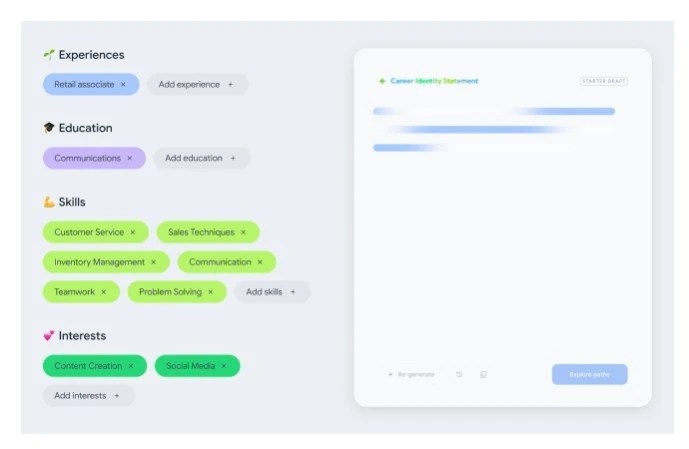
Looking for fresh career ideas or trying to pivot into a brand-new field? Google’s experimental tool, Career Dreamer, uses AI to translate your unique skills, experiences, and interests into a personalized roadmap of real job possibilities. Here’s a streamlined walkthrough you can copy-paste straight into WordPress to hit “Publish” in minutes.
Disclaimer: Before you dive in the details, Career Dreamer is currently available only to users based in the US.
Why Pay Attention to Career Dreamer?
- AI-powered clarity: Turns scattered experiences into a crisp Career Identity Statement you can paste into your résumé or LinkedIn headline.
- Visual exploration: An interactive web of career paths reveals both conventional roles and creative options you may have never considered.
- Built-in next steps: Jump straight into Gemini (Google’s AI assistant) to draft cover letters, spruce up your résumé, or map out learning plans.
- Free & browser-based: No downloads, no credit card, and your data stays in your own browser.
5-Step Quick-Start Tutorial
Time needed: About 15 minutes (plus extra if you decide to deep-dive).
1. Open the Tool
Visit grow.google/careerdreamer on Chrome, Safari, or Firefox. (Edge isn’t fully supported.)
2. Build Your Profile
Add snapshots of your:
- Past roles (paid or volunteer)
- Education/training (courses count!)
- Top skills (hard and soft)
- Personal interests
Tip: Select “Show me suggestions” if you’re stumped, Career Dreamer will surface common tasks and transferable skills for each role you enter.
3. Craft Your Career Identity Statement
Click “Generate.” Edit or re-spin the text until it nails your value proposition.
Copy & save this statement since it can become your elevator pitch, résumé summary, and LinkedIn headline all in one.
4. Explore Career Paths
Hit “Explore Paths.” You’ll see:
- Blue dots: Data-backed roles (salary, growth outlook, common skills).
- Green dots: AI-inspired ideas (great creativity sparks).
Hover any dot for role details, then “Save” ones that excite you.
5. Jump to Gemini for Action
Select a saved role and click “Draft with Gemini.” Paste the auto-generated prompt and ask Gemini to:
- Rewrite your résumé bullet points for this role
- Draft a tailored cover letter
- List top courses or certificates (e.g., Google Career Certificates)
- Identify local openings via “Jobs Near Me” search
Pro Tips to Get the Most Out of Career Dreamer
| Goal | Feature to Use | Pro Hack |
|---|---|---|
| Clarify transferable skills | Skill-selection screen | Select “Explain” to view mini-definitions you can repurpose in interviews |
| Compare salary ranges | Hover over blue-dot roles | Look for the “Similar jobs” link to spot lateral moves with better pay |
| Stress-test a career idea | Gemini chat | Ask, “What industry trends might make this role obsolete in 5 years?” |
| Build a learning path | “Certificates & Courses” links | Filter by free or <50 hours to upskill quickly |
| Keep momentum | Browser auto-save | Reopen the site later—your data stays in your cache for up to 30 days |
Who Will Love This Tool?
- Career changers itching to translate existing know-how into new industries.
- Students & grads unsure how classroom projects become résumé gold.
- Returning caregivers who need language to turn life skills into job skills.
- Gig workers wanting to map side-hustle talents to full-time opportunities.
What Career Dreamer Doesn’t Do (Yet)
- Direct job matching: It won’t list live vacancies like LinkedIn or Indeed.
- Global labor data: Currently U.S.-centric, so salaries & growth rates skew American.
- Long-term data storage: Clearing your cache wipes your profile; hence, it is advisable to export key text first!
Final Word
In a market obsessed with skills first hiring, Career Dreamer offers a fast, engaging way to discover hidden strengths and visualize fresh career directions—all for free. Give it a spin today, rewrite your professional story, and let AI light up possibilities you never knew existed.
 Just Being Resourceful!
Leave a comment