
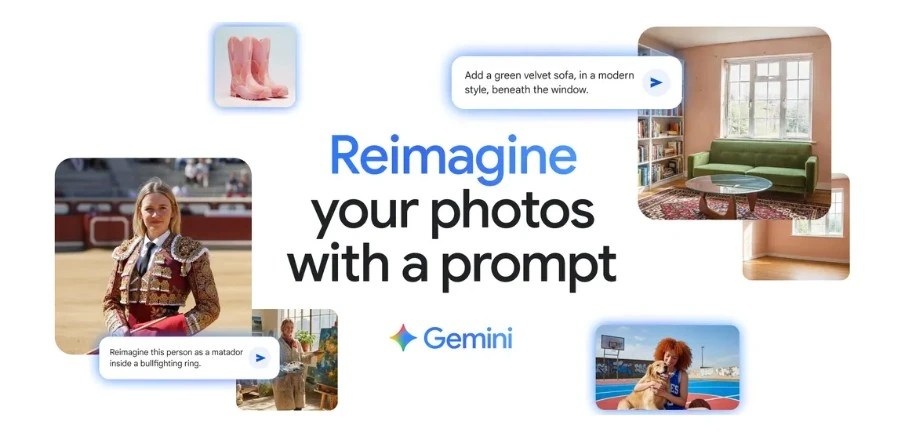
Here’s what happened while most of us were sleeping: Google quietly released something called “Nano Banana” that completely demolished every other AI image editor on the planet. And here’s the kicker – it wasn’t even officially announced. It just appeared on LMArena (the platform where AI models duke it out) under this mysterious banana emoji, crushing the competition so hard that people started calling it the Photoshop killer.
Turns out, Google was behind this the whole time. And now they’ve officially launched it as Gemini 2.5 Flash Image inside the Gemini app. What we’re looking at here isn’t just another incremental update – this is the kind of leap that makes you question why you’re still paying for expensive photo editing software.
The Problem Every AI Image Editor Had (Until Now)
You know that frustrating moment when you ask an AI to change someone’s shirt color, and suddenly their face looks completely different? Or when you try to put yourself in a different location, but the result looks like a bad deepfake from 2019?
That’s because most AI image editors treat every edit as a completely new generation. They don’t understand that when you say “change my hair color,” you still want to look like… well, you.
Google’s new model fixes this fundamental problem. It maintains what they call “character consistency” – meaning you can transform yourself into a 1960s doctor, a baker, or even put a tutu on your chihuahua, and everyone will still recognize who (or what) they’re looking at.
What Makes This Different (And Why Everyone’s Going Crazy)
Speed That Actually Matters
While other AI tools take 10-15 seconds to generate results, Nano Banana typically completes edits in 1-2 seconds. This isn’t just about saving time – it completely changes how you work. Instead of waiting around and losing your creative momentum, you can iterate in real-time.
The 90% Success Rate
Here’s something wild: this model achieves a 90% first-try success rate. That means no more rolling the dice hoping the AI understands what you want. The first result is usually spot-on.
Multi-Image Blending That Actually Works
You can now upload a photo of yourself and another of your dog, then ask Gemini to create a new image of you both on a basketball court. The AI doesn’t just paste images together – it creates a cohesive new scene that looks like it was actually photographed.
Multi-Turn Editing Like Having a Conversation
Start with an empty room, paint the walls blue, add some furniture, then a coffee table. Each edit builds on the previous one while preserving everything else. It’s like having a design conversation with someone who never forgets what you’ve already done.
How to Actually Use This Thing (Step-by-Step)
Step 1: Access the Gemini App
- Download the Gemini app if you haven’t already
- Log in with your Google account
- Look for the image upload icon in the chat interface
Step 2: Upload Your Starting Image
- Tap the upload button
- Choose a photo from your gallery or take a new one
- The image appears in your chat
Step 3: Tell Gemini What You Want
Instead of complex commands, just talk normally:
- “Change my hair to auburn”
- “Put me in a mountain landscape”
- “Make this look like it was taken at sunset”
- “Add a golden retriever sitting next to me”
Step 4: Keep Refining
- Don’t like the first result? Keep chatting
- “Make the sunset more dramatic”
- “Change the dog to a black lab”
- “Add some clouds to the sky”
Each conversation builds on your previous edits, so you can get exactly what you want without starting over.
Real-World Ways to Use This
Content Creators: Generate multiple outfit changes or location shots from a single photo session. Create consistent brand imagery without expensive photoshoots.
Small Business Owners: Transform product photos for different seasons, add lifestyle elements, or create variations for A/B testing your marketing materials.
Social Media: Turn ordinary photos into scroll-stopping content. Change backgrounds, add elements, or create themed variations for different platforms.
Personal Projects: Create family photos that never happened (like putting grandparents who never met in the same picture), design custom holiday cards, or just have fun with creative transformations.
The Technical Stuff That Actually Matters
Under the hood, this runs on Google’s Imagen 4 model, but what really makes it special is how it preserves context across edits. The model understands the relationship between different elements in your image and maintains those relationships even as it makes changes.
All edited images include both visible watermarks and Google’s invisible SynthID technology. This digital fingerprint helps identify AI-generated content, which is increasingly important as these tools become more sophisticated.
Why This Matters More Than You Think
We’re looking at the democratization of professional-level image editing. What once required years of Photoshop expertise can now be done by anyone in seconds. But that same accessibility raises important questions about authenticity and how we distinguish between real and AI-edited content.
Google’s approach with visible and invisible watermarking is one attempt to address this, but the broader implications are still unfolding.
The Bottom Line
Google’s Nano Banana isn’t just another AI tool – it’s a fundamental shift in how image editing works. The combination of speed, consistency, and natural language control makes it accessible to everyone while delivering professional-quality results.
The fact that it’s currently free to use in the Gemini app makes this a no-brainer for anyone who works with images. Whether you’re a content creator, business owner, or just someone who wants to have fun with photos, this tool is worth trying.
Just remember: with great power comes great responsibility. Use these tools ethically, respect others’ privacy, and always be transparent about AI-generated content.
Ready to try it yourself? Open the Gemini app and start experimenting. The only limit is your imagination (and Google’s content policies).
 Just Being Resourceful!
Leave a comment