
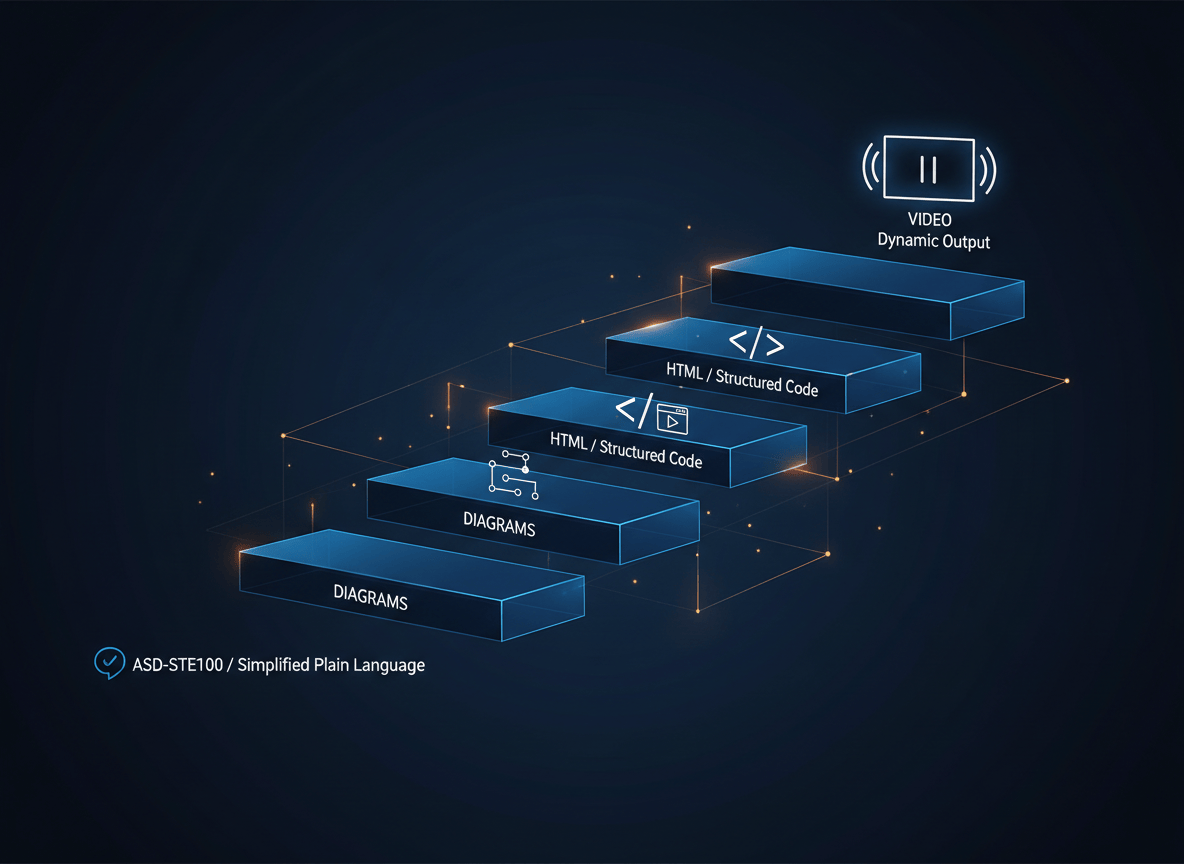
AI tools keep getting better at doing the work, which quietly turns you into a full-time reader. Andrej Karpathy just shared a four-step ladder for making everything an AI writes easier to understand, and you can start climbing it with one extra line in your next prompt.
Think about your week. You skim an AI summary of a report, read a code explanation you only half follow, and approve a research brief because it sounds right. Less of your job is doing. More of it is checking.
On October 2, 2026, Karpathy, a founding member of OpenAI and the former head of AI at Tesla, said exactly that on X: we will spend a lot more time trying to understand what language models produce. Then he shared a ladder of four output formats, each one easier to absorb than the one before.
Here is what the ladder is, how to use every rung today, and where it breaks.
The Ladder at a Glance
| Rung | Ask your AI for | Best when | Watch out for |
|---|---|---|---|
| 1 | Writing in ASD-STE100 | You need to read fast and be sure | Strict mode can drop facts |
| 2 | A diagram | The answer has parts, steps, or flows | A tidy picture can hide a wrong link |
| 3 | An HTML page | You want to poke at the idea | Check the numbers behind the visuals |
| 4 | An explainer video | You need to learn it or teach it | Slowest to build, easiest to over-trust |
Start at the bottom. Climb only when the rung you are on leaves you confused.
Rung 1: Ask for ASD-STE100 Writing
ASD-STE100 is Simplified Technical English. The aerospace industry built it so that mechanics who are not native English speakers could not misread a maintenance manual. The current version, Issue 9, was released on January 15, 2025, and you can download it for free.
It comes down to two parts: 53 writing rules and a dictionary of about 900 approved words. Each word gets one meaning. Procedure sentences cap at 20 words and descriptive sentences at 25, according to technical writer Kruno Golubić. One idea per sentence. Active voice. No fancy vocabulary.
Karpathy says models know this standard well and the results are often far more readable than their default style. Because the full spec is stringent, he sometimes asks for 80% of the way to ASD-STE100.
How to Use It (3 Steps)
- Paste the thing you are trying to understand. A contract clause, an error message, a research abstract, a code block.
- Add the style line. Copy this prompt and swap in your topic:
Explain this in simple technical English, about 80% of the way to ASD-STE100. Keep sentences short. One idea per sentence. Use the exact technical terms from my text. Do not drop any facts, numbers, or caveats.
- Run the same question once without the style line. Put the two answers side by side. You will see the fog the style line removes.
That last sentence in the prompt matters more than it looks. I will explain why in the limitations section.
Rung 2: Ask for a Diagram
Some answers are really maps. A refund process, a startup funnel, how data moves between apps. Paragraphs are a poor way to hold a map in your head.
Karpathy’s tip is simple: instead of writing, ask for a diagram. The easiest practical route is a text-based diagram format called Mermaid, which most AI tools can write and which renders for free in the Mermaid Live Editor.
How to Use It (4 Steps)
- Describe the process or paste the document.
- Paste this prompt:
Turn this into a Mermaid flowchart. Show each step as a box and each handoff as an arrow. Mark every decision point. Add a one line caption for each section. Use only steps that appear in my text.
- Copy the code the AI gives you into mermaid.live.
- Check every arrow against the source. If an arrow has no support in your text, ask the AI why it is there.
Step 4 is the habit that makes diagrams safe. A clean picture feels true even when it is not.
Rung 3: Ask for a Web Page
Here Karpathy says to ask for the output in HTML. His point: models are getting very good at front-end work, so you can get an interactive page with animations instead of a wall of text.
Picture a pricing model. A paragraph tells you revenue rises if you add a tier. A page with a slider lets you drag the price and watch the numbers move. You understand it in ten seconds instead of two minutes.
How to Use It (5 Steps)
- Paste your topic, data, or document into the chat.
- Paste this prompt:
Explain this as one self-contained HTML file. No external libraries. Include one interactive element, such as a slider or a step-through button, that shows what changes when I change an input. Keep all text in simple technical English.
- Save the response as a file ending in .html. Any plain text editor works.
- Double-click the file. It opens in your browser.
- Ask for changes in plain words: make the chart bigger, add a reset button, show the formula under each number.
If your AI tool shows previews inside the chat, you can skip steps 3 and 4. Either way, treat the page like any file from the internet. Do not type passwords or private data into pages you did not build yourself.
Rung 4: Ask for an Explainer Video
This is the rung Karpathy is most bullish on: a fully custom explainer video on any topic you choose. His example prompt asks for a 3Blue1Brown style video and an ElevenLabs API key for the narration. He says this is starting to work.
The 3Blue1Brown look comes from Manim, an animation library for explanatory math videos. The community edition is the one the Manim project itself recommends for ongoing development. Your AI writes the code. Manim draws the frames.
How to Use It (6 Steps)
- Pick one narrow topic. How compound interest works beats everything about finance.
- Ask for the script first. Reading a script costs you two minutes. Rendering a bad video costs you twenty.
- Let the AI check your setup. Use a coding assistant that can run commands on your computer. Ask it to confirm Python and FFmpeg are installed and to install Manim Community Edition. Math text may also need a LaTeX install.
- Choose your voice. Use ElevenLabs if you have an API key. If you do not, Karpathy suggests asking your AI to find free alternatives that run on your own computer.
- Paste this prompt:
Create a 3Blue1Brown style video explainer on [topic]. Use Manim Community Edition. Keep it under three minutes. Write the narration script first and wait for my approval. Then render a low quality preview before the final version. For narration, use the API key stored in an environment variable on my computer. If I have no key, suggest free text to speech tools that run locally.
- Watch with the script open. Pause at every claim. Fix errors in the script, then re-render.
One safety tip from me, not Karpathy: never paste an API key into a chat window. Store it as an environment variable and tell the AI to read it from there. Chats get saved, shared, and synced.
Which Rung Should You Pick?
Here is the shortcut I use:
- Checking a claim or a document? Rung 1. You want precision.
- Many parts talking to each other? Rung 2. You want the map.
- Need to test a what-if? Rung 3. You want to drag things around.
- Learning from scratch or teaching a team? Rung 4. You want a story.
Real use cases: a student turns a tough lecture into a video before an exam. A founder turns a payment flow into a diagram before talking to a developer. A shop owner turns a supplier price list into an HTML calculator and never touches a spreadsheet formula.
The Bigger Idea Hiding in the Tweet
Karpathy ends with two points. First, as models do more of the legwork on their own, more of our work moves up into oversight and understanding. Second, code is now cheap enough that you can ask for large, custom, throwaway software artifacts, like a web app or a video, that would never have been worth building before.
What this really means: the question is no longer whether an answer is worth a custom page. It is whether you can afford to keep reading plain text when a page takes two minutes to generate. Build the thing, use it once, delete it.
Honest Limitations
This ladder is useful. It is not magic, and a few things deserve a straight look.
Strict STE can cost you facts. Developer Lucian Ghinda tested this on four pieces of code. Claude’s average sentence dropped from about 18 words to roughly 9 or 10. A loose simple technical English request lost 8.5% of the code-specific facts. The full ASD-STE100 request lost 46.8%. He calls it a quick check, not a rigorous study, but it backs up Karpathy’s 80% instinct. That is why the prompt above says do not drop any facts.
The model has no dictionary check. Golubić points out that AI follows the spirit of STE, not the approved word list. You get STE-flavored English, not certified STE.
It is English only. The standard exists for English, so the trick transfers to other languages only as a general habit of short, plain sentences.
Pretty is not proof. A diagram, page, or video can look polished and still be wrong. Treat every output as a view of the answer, then verify the claims that matter against the original source.
Video takes real setup. Rungs 1 to 3 work in any chat window. Rung 4 needs tools installed and some patience.
Try This Today (15 Minutes)
- Find one AI answer from this week that you skimmed and never really understood.
- Run it through Rung 1 with the prompt above.
- Still fuzzy? Ask for the Rung 2 diagram.
- Still fuzzy? Ask for the Rung 3 page and drag the slider.
- Tell me in the comments which rung finally made it click.
Most people will never leave rung 1 for anything but their most important topics. That is fine. The skill is knowing the other three rungs exist.
Know someone who reads AI output all day and never feels sure about it? Send them this post. It might save them an hour this week.
Sources
- Andrej Karpathy on X: original post on understanding LLM outputs
- ASD-STE100: About Simplified Technical English (official site)
- ASD-STE100: Free standard download
- Kruno Golubić: ASD-STE100, What It Is and What It Has to Do with LLMs
- Lucian Ghinda: Explain to me in Simple Technical English
- Manim Community Edition on GitHub
- Mermaid Live Editor
- ElevenLabs


Leave a Reply