
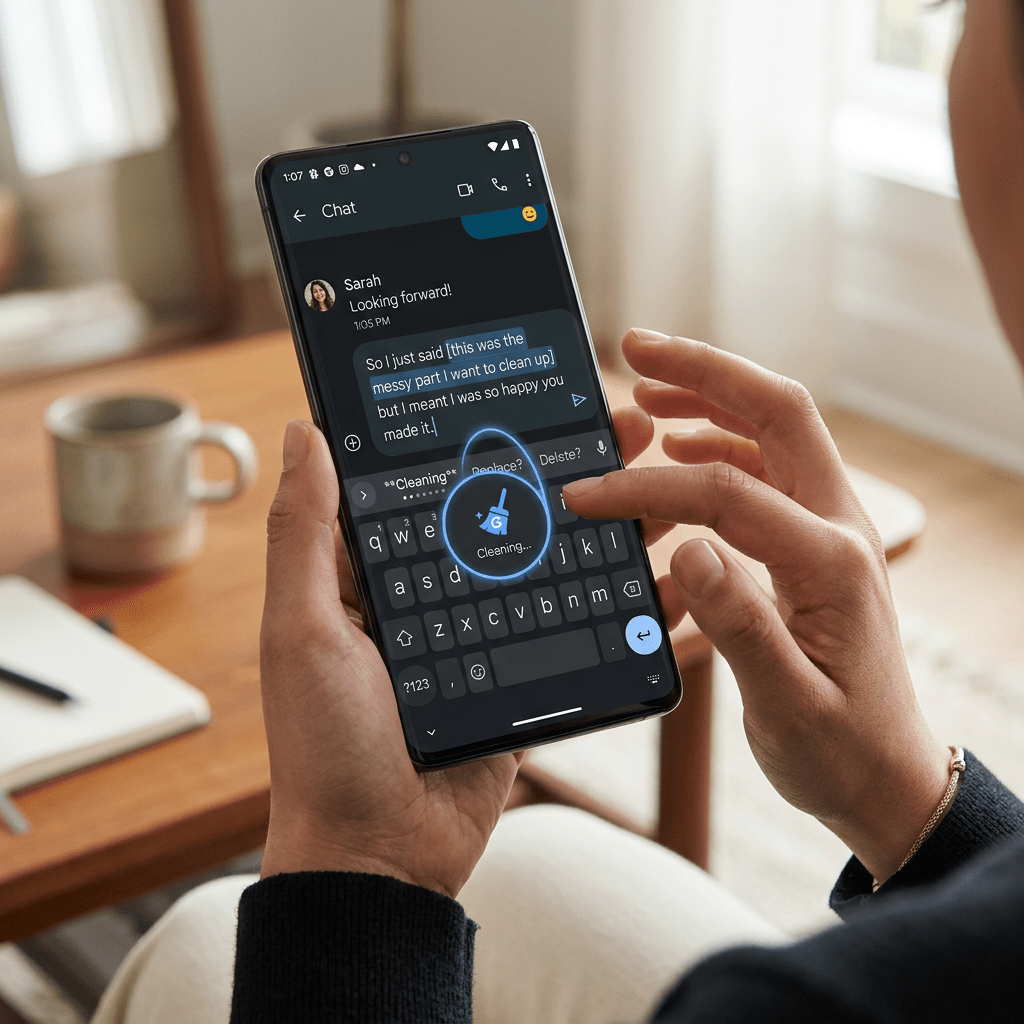
Open Gboard. Tap the microphone. Speak the way you actually think, with all the “ums,” the mid-sentence corrections, the moment you switch from English to Hindi because the right word came faster in the other language.
Now imagine the keyboard quietly listening, understanding, and handing you clean, polished text. No edits. No retries.
That is Rambler. And Google just made it the new default on every Android phone that matters.
What Google Actually Announced
At The Android Show: I/O Edition 2026 on Tuesday, Google unveiled a bundle of new AI features under a fresh banner called Gemini Intelligence. Rambler is the headline act for anyone who types a lot on their phone.
Here is the short version:
- Rambler is a Gemini-powered dictation feature built into Gboard, the keyboard most Android users already type with every day.
- It listens to your speech, transcribes it, and cleans it up in real time, removing filler words, repetitions, and mid-sentence corrections.
- It uses Gemini-based multilingual models with code-switching, so you can flip mid-sentence between English and Hindi (or any supported language) without losing context.
- Audio is never stored. It is used only to transcribe what you say.
- It runs on a hybrid stack: simpler asks handled by on-device Gemini Nano, heavier ones routed to the cloud.
- Initial rollout this summer is on Samsung Galaxy and Google Pixel phones, with broader Android support to follow.
That last point is the one most coverage is underselling. Gboard is the default keyboard for hundreds of millions of people. When Google ships a feature into Gboard, it does not need a marketing campaign. It just appears.
How Rambler Is Different From the Voice Typing You Already Have
The old voice typing button on Gboard transcribed exactly what it heard. If you said, “I am going to meet you on Wednesday at our usual coffee shop at 3 p.m., um, 2 p.m.,” it gave you all of that, ellipsis included, and left you to clean it up.
Rambler is doing real comprehension on top of transcription. Here is what that actually looks like in practice:
- Filler words vanish. No more “um,” “uh,” “like,” or “you know” cluttering up your message.
- Self-corrections are honoured. Say “Meeting at 3 p.m., wait no, 2 p.m.” and the output reads “Meeting at 2 p.m.”
- It understands intent shifts. Dictate a shopping list of apples, bananas, and oranges, then say “actually skip the apples,” and the apples are out.
- It works everywhere Gboard works. Email, WhatsApp, Slack, your notes app, your browser address bar. Google described it during the briefing as “reinventing the keyboard.”
- It tells you when it is on. Gboard surfaces a clear visual cue whenever Rambler is active, so you are never wondering whether the AI is doing the work or you are.
If you have been paying for Wispr Flow, Superwhisper, or Typeless on your desktop, you already know how good this experience feels. Rambler brings that same feel into the place you do most of your messaging: a phone keyboard.
The Code-Switching Bit That Indian Users Should Care About Most
Code-switching is when you slide between two languages inside the same sentence. “Yaar, I will send you the deck by EOD” is code-switching. “Aaj ka meeting cancel hai” inside an English email is code-switching. Anyone who has worked in an Indian office, run a WhatsApp group with friends, or texted family knows this is how people actually talk.
Most Western-built dictation apps have been clumsy about this. They lock to one language at a time. The moment you slide into Hindi, the transcription collapses or guesses badly.
Rambler treats code-switching as a first-class behaviour, not an edge case. Google’s Gemini models already speak more than a hundred languages, and the dictation pipeline is built to keep context as you switch.
For an Indian founder dictating a board update, a sales rep replying to a customer in Marathi over WhatsApp, or a journalist taking quick notes between two Urdu and English thoughts, this is not a nice-to-have. It is the difference between using voice dictation and not bothering.
Why This Is Bad News for Dictation Startups
Over the last two years, a small wave of polished AI dictation apps has built real audiences: Wispr Flow, Superwhisper, Willow, Monologue, Handy, and Typeless among them. Most of that traction has been on Mac, Windows, and iOS. Android, oddly, has been the underserved market.
Rambler closes that gap in one move. And it does so in the worst possible way for a startup: by arriving pre-installed and free.
The strategic problem for these companies is not that Google’s product is necessarily better today. It is that Google’s product is right there. Most users will never go look for an alternative. To survive, third-party apps now need at least one of the following:
- Materially better accuracy, especially in a specific domain (legal, medical, technical jargon).
- Deeper workflow features Gboard will not bother building (custom dictionaries, shortcut macros, deep integration with niche apps).
- Stronger privacy guarantees than a Google product can credibly claim, often by running fully on-device.
- A different surface area, like desktop-first dictation for knowledge workers, where Gboard is not the default.
Google itself has hedged on the on-device angle. The company released AI Edge Eloquent, an offline-first dictation app powered by its on-device Gemma models, on iOS in April 2026. Read together, the two launches look like Google quietly fencing off both ends of the dictation market.
If you are running a dictation startup, the question is no longer whether your product is good. It is whether it is good enough that someone will actively go looking for it.
How to Try Rambler When It Lands on Your Phone
Rambler starts rolling out to Pixel 10 and Galaxy S26 devices this summer, with wider Android support to follow.3 When it reaches your device, here is the cleanest way to start using it.
- Update Gboard to the latest version. Open the Google Play Store, search for Gboard, and tap Update if it shows up.
- Set Gboard as your default keyboard. Go to Settings, then Language & input, then On-screen keyboard, and make sure Gboard is selected.
- Open any app where you can type. Messages, Gmail, WhatsApp, the browser bar, anywhere.
- Tap the microphone icon on Gboard. If your phone has the Rambler update, you will see a clear in-keyboard indicator that Rambler mode is active.
- Speak naturally. Do not police your “ums.” Do not retype if you change your mind mid-sentence. Just say what you would have said to a colleague on a call.
- Watch the text refine itself in real time. If something does land wrong, you can tap to edit just like any other Gboard input.
- Try a code-switch on purpose. Start in English, drop a Hindi or Tamil phrase mid-sentence, and check how cleanly Rambler handles it. This is the easiest way to feel the difference from older voice typing.
A useful habit: spend a week using Rambler for every WhatsApp message longer than two lines. That is where the time savings show up first, and where you stop wanting to go back.
The Honest Limitations
A few caveats worth keeping in mind before you cancel your dictation subscription:
- Initial rollout is limited. Rambler launches on Pixel 10 and Galaxy S26 first. Older Android phones and other brands will get it later, with no firm date.
- It is partly cloud-based. The heavier lifting happens in Google’s cloud. If you are uneasy about your speech transit, audio is not stored, but the processing is not fully offline.
- Niche vocabulary may still trip it up. Generalist Gemini models handle most speech well. Medical, legal, or highly technical dictation may still favour specialist tools with custom dictionaries.
- Some Gemini Intelligence features are tied to newer hardware. Not every Android phone will see every feature.
- Indian languages will keep improving. Code-switching support is genuinely good, but expect the experience for less-resourced Indian languages to improve over the next few model updates.
The Bottom Line
Voice typing on a phone has been “almost useful” for a decade. Rambler is the first time it actually feels like dictation done by an adult who is paying attention.
For everyday users, this is a small free upgrade with a real, daily payoff. For knowledge workers who type long messages on the move, it is a notebook in your pocket. For Indian users who slide between two or three languages without thinking, it might be the first dictation tool that does not break the moment you stop speaking only English.
And for dictation startups, it is the day the platform finally noticed their category. That was always going to happen. It happens this summer.
If you know someone who still types long WhatsApp messages with two thumbs and a sigh, send this to them. They are about to get their evenings back.
Sources and further reading
- TechCrunch, Google adds Gemini-powered dictation to Gboard, which could be bad news for dictation startups (May 12, 2026).
- Android Authority, Gboard is learning to turn your rambling into polished text.
- TechCrunch, Google brings agentic AI and vibe-coded widgets to Android (May 12, 2026).
- 9to5Google, Gemini Intelligence brings gen UI widgets, Gboard Rambler to Android, debuting on Pixel and Samsung.
- Android Authority, Google’s making its biggest push yet for putting Gemini to work as an actual assistant on Android.
- Google DeepMind, Gemini model overview.


Leave a comment