
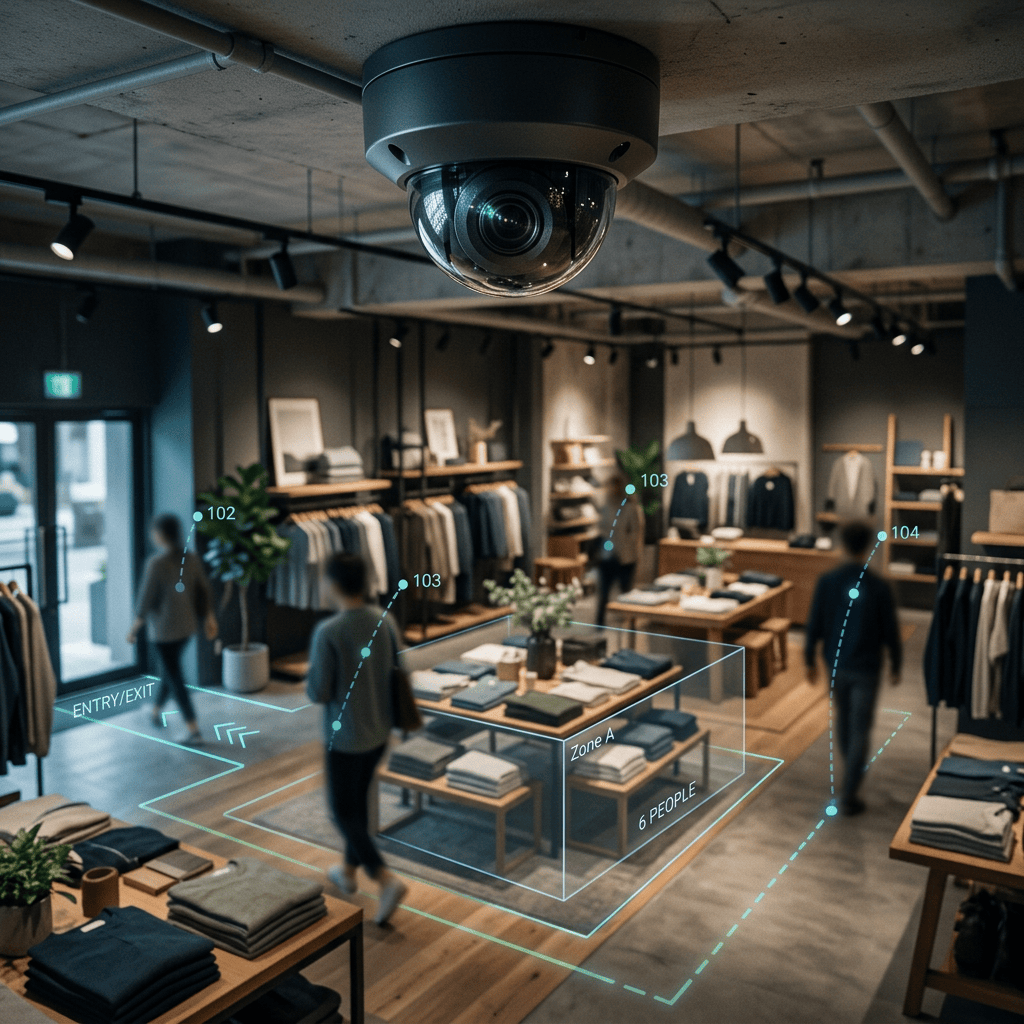
IKEA spent years redesigning its stores around guesswork, and it still took the company ages to figure out that nearly a third of its visitors were showing up for the meatballs, not the furniture. That is the blind spot every physical retailer lives with. Online stores know exactly which product you hovered over and exactly where you gave up and left the site. A shop with four walls only finds out what worked when someone reaches the till. Here’s how to close that gap with tools that already exist, most of them free, using the security camera you probably already own.
The blind spot every physical store has (and Amazon doesn’t)
An e-commerce store can track every click, every scroll, every product page you lingered on, and the exact second you closed the tab. That data gets analyzed, tested, and acted on constantly. A physical store gets none of it. It knows what sold. It has no idea what almost sold, what got picked up and put back, or what nobody even noticed.
IKEA is the textbook example, mostly because it is one of the few retailers that has actually tried to measure this. Even with all its resources, it took real research to establish something that now looks obvious: an estimated 30% of visits to an IKEA store are made purely to eat at the in-store restaurant, according to research firm the Hartman Group. That is not a rounding error. That is a third of your foot traffic walking through your product displays for reasons that have nothing to do with buying anything.
If a company with IKEA’s budget needed years and outside researchers to learn that, the average independent store or small chain is flying almost completely blind. Not because the data doesn’t exist. Because nobody is looking at it.
You already own the sensor. You just delete the footage.
Most stores, even small ones, already have security cameras pointed at the entrance, the aisles, and the checkout counter. That footage captures exactly the kind of behavior online retailers pay analytics platforms a fortune to track: where people stop, where they linger, where they turn around and walk out with empty hands. Instead, it usually just loops for a few weeks and gets overwritten, watched only if something gets stolen. It’s one of the most underused data sources in small business retail, sitting on a hard drive in the back office, doing nothing.
The reason nobody analyzes it isn’t a lack of interest. It’s that “video analytics” sounds like something only a company with a data science team can afford. That stopped being true a while ago.
The free tools that turn a camera feed into real numbers
Two open-source projects from computer vision company Roboflow do most of the heavy lifting here, and neither one requires an enterprise contract to use.
The first is Supervision, an open-source Python library, MIT licensed, that handles the unglamorous but essential parts of a computer vision pipeline: turning raw model predictions into a usable format, drawing boxes and labels on video, tracking the same person across frames instead of recounting them, and counting how many detections pass through a defined zone. It has crossed 38,000 stars on GitHub and gets over a million downloads a month, which tells you it isn’t some obscure side project. It’s the connective tissue that most retail analytics products are quietly built on top of.
The second is RF-DETR, a real-time object detection model built on a DINOv2 vision transformer backbone. Its base sizes are Apache 2.0 licensed, meaning free to use and fine-tune, and it’s fast enough to process video as it comes in rather than crawling through it frame by frame overnight. Point it at footage of a store aisle and it will find every person in frame in real time, no manual labeling required to get started.
If writing Python isn’t your idea of a good afternoon, Roboflow also has a no-code option called Workflows, a drag-and-drop builder that chains a detection model, a tracker, and a counter together without you writing a line of code. Same underlying tech, friendlier interface.
One honest caveat before you get excited: Roboflow’s free “Public” plan gives you real usage credits and full access to these tools, but anything you build on it, including your trained models, gets listed publicly on Roboflow Universe. That’s fine for learning and testing on sample footage. It’s not where you want to run actual footage of your paying customers. For that, you would need a paid Core plan, which keeps your data private. Check current pricing here since it shifts.
What this actually tracks, and what it deliberately does not
This is the part that matters most, so it’s worth being precise about it. A setup built this way counts people and tracks their movement zone by zone. It doesn’t identify who those people are. There is no facial recognition step, no matching against a database, no name attached to any of it. Every shopper is just a bounding box with a temporary ID number that resets once they leave the frame.
Done properly, this gives you exactly the kind of insight IKEA had to hire researchers to uncover: which entrance gets the most traffic, where people slow down and where they speed up, which product displays get walked straight past without a glance, and which aisles people enter and then leave without picking anything up. That last one is the closest thing physical retail has to an e-commerce “abandoned cart.”
How to actually set this up, step by step
You don’t need a machine learning background to get a working version of this running. You do need a few hours, a laptop, and a sample clip of your own footage.
- Pull a short clip, not your whole archive. Fifteen to twenty minutes of footage from one camera, ideally one covering an entrance, a specific aisle, or the checkout queue, is plenty to build and test with before you scale up.
- Create a free Roboflow account and grab an API key. This takes a couple of minutes and doesn’t require a credit card for the Public plan.
- Choose your path. If you’re comfortable with basic Python, install the
supervisionandrfdetrpackages and work in a notebook. If not, open Workflows and use the visual builder instead. Both reach the same result. - Run a pretrained people-detection model over your clip first. You don’t need to train anything from scratch to see if this is worth pursuing. RF-DETR’s off-the-shelf model will already find people in most footage reasonably well.
- Add a tracker so people get counted once, not every frame. This is where the ByteTrack tracker comes in. It assigns each shopper a stable ID that persists even when they briefly disappear behind a shelf or another customer, which a simple frame-by-frame count can’t do.
- Draw a line or a zone over the part of the store you actually care about. A line across the entrance counts entries and exits. A polygon zone around a display counts how long people linger there. Roboflow’s line counter and zone tools handle both without custom code.
- Let it run for a few days, then look at the numbers, not the video. The annotated footage is useful for sanity-checking that the model is working correctly. The actual value is in the exported counts: entries by hour, dwell time by zone, and which displays get the least attention.
- Fine-tune once you know it is worth it. A generic people-detection model trained on public data will make more mistakes on your specific camera angle, your lighting, and your store layout than a model trained on your own footage. Labeling a few hundred frames from your actual cameras and fine-tuning on that closes most of the gap. This step is optional at first, but it’s what separates a fun weekend project from something you can actually trust for staffing or layout decisions.
Realistically, if you already know basic Python, getting a rough version working on a sample clip is an afternoon’s work. Getting it production-ready, tuned to your cameras, running reliably, and feeding into a dashboard you actually check, takes longer. Budget for that honestly instead of expecting it to be finished by dinner.
Privacy: do this right, or do not do it at all
This is not optional reading. Recorded video of identifiable people counts as personal data under most privacy laws, camera footage included, whether or not you run any AI on it at all. The moment you add analytics, the rules don’t relax. They tighten.
The good news is that the approach described above, counting movement and tracking anonymous, temporary IDs without ever matching a face to an identity, stays clear of the strictest category of rules. Under the EU’s GDPR, facial recognition creates biometric data subject to much stricter conditions than ordinary video monitoring does. Keep facial recognition out of your pipeline entirely and you avoid that whole category of legal exposure. Turn it on, even accidentally through a vendor feature you didn’t fully understand, and you’re in a different and far riskier situation.
A few things apply almost everywhere, regardless of which country you are in:
- Put up clear signage. Tell people cameras are in use and, ideally, what the footage is used for. This is a baseline expectation under GDPR and similar laws elsewhere, and it costs you nothing.
- Don’t identify anyone. Stick to counting and zone tracking. The second you add face matching, you’ve entered a much stricter regulatory category, and in some places, like under the EU AI Act, certain uses like emotion detection in some settings are restricted outright.
- Don’t hoard footage or data. Keep raw video only as long as you actually need it, and delete or anonymize the rest. “We might need it someday” isn’t a great data retention policy anywhere.
- Check your own jurisdiction before you deploy anything. Rules differ meaningfully between the EU, individual US states like Illinois and California, India, and elsewhere. This is general information, not legal advice, so treat it as a starting point for a proper check, not the final word.
Honest limitations
A few things worth knowing before you sink a weekend into this.
- Off-the-shelf accuracy is a starting point, not a finish line. A public pretrained model will miss detections and misfire on your specific lighting, camera angle, and store layout until you fine-tune it on footage from your own cameras.
- Free means public, not private. Run this on real customer footage under a plan that actually keeps your data private, not the free tier.
- This won’t replicate what a company like IKEA has. You’re not getting a full data science team or years of A/B testing. You’re getting traffic counts and dwell times, which is still a significant upgrade from knowing nothing at all.
- Scaling to many cameras is a later problem. One camera on a laptop is a weekend project. Ten cameras running continuously is an infrastructure decision. Don’t try to solve both on day one.
Most small stores are sitting on more retail intelligence than they realize, recorded, timestamped, and quietly overwritten every few weeks. The tools to actually use it are free. The only thing standing between your CCTV footage and IKEA-level foot traffic data is a weekend and a willingness to try.


I just love this. You had me at IKEA! I’ve always been fascinated with marketing and its analytics. This is amazing. Thank you for such a well thought out piece. It makes so much sense!!
LikeLiked by 1 person